While using video on your website was previously a struggle (to put it mildly), advances in web technology now mean manipulating moving images is just as simple as working with their static siblings. What’s more, WordPress handles a variety of video formats from a range of different hosting sites.
In this article, we’re going to give you the lowdown on how to embed video in WordPress, along with how to leverage the many different sources available. However, first we’ll discuss our favorite plugins to embed video in WordPress. Let’s get started!
Video Embed Plugins for WordPress
Fortunately, embedding video in WordPress is a cinch – especially when you have a quality plugin to hand. Let’s take a look at a few of our favorites.
Video Embed & Thumbnail Generator

First up is the Video Embed & Thumbnail Generator plugin. This effectively kills two birds with one stone. First, you can embed video using a shortcode that results in a responsive HTML5 video on your site (with Flash fallback for those not yet supporting HTML5). What’s more, you can also generate suitable thumbnails for your videos, and the functionality is comprehensive and well-thought through.
YouTube Embed Plugin

One of the easiest ways to upload and view videos online is through YouTube. Once you upload your content, use the YouTube Embed Plugin to put it into your site. The plugin allows you to add an entire YouTube playlist right onto your site, or opt for a video gallery. You can choose to enable automatic play or let users scroll through the playlist. YouTube Embed creates custom thumbnails do you don’t have to.
Upon downloading the plugin, you’ll get a special button for YouTube right next to Add Media. That makes it incredibly easy to pull in any videos you want. If the channel is your own, add a Subscribe button below the video gallery and boost your numbers.
ARVE Advanced Responsive Video Embedder

An alternative is the Advanced Responsive Video Embedder (ARVE). While it doesn’t support thumbnail generation in the free version, there are an almost overwhelming number of video providers – including favorites such as YouTube and Vimeo. However, there are a number of premium add-on features – including automatic or manual thumbnail generation – so if you have the budget, ARVE could be the only plugin you need to embed videos into WordPress.
WP Video Lightbox

WP Video Lightbox allows you to display videos in a different way. When a user starts to play a video, it will pop out and make the screen behind the player dark. This makes it easier to view the video without the distractions of the post and ads behind it. The plugin works with YouTube or Vimeo and it’s a very easy embed process. Some sites begin playing the video in the form it appears on the site, which makes it hard to properly view. WP Video Lightbox puts special attention on it.
If you don’t have a lot of video content, the plugin can also be used to create a lightbox for photographs and other images. A great idea for infographics or diagrams.
Embedding YouTube and Vimeo Videos in WordPress
As we alluded to, embedding videos in WordPress is super simple, regardless of the video platform you’re using. The good news is that you don’t necessarily need a plugin to embed video into your WordPress website.
If you have a YouTube or Vimeo video, for example, WordPress includes an automatic embedding option that is enabled by default. To leverage this, first grab the URL of the video you’re interested in embedding:

Next, head to the edit screen of a page or post of your choosing within the WordPress back end – it doesn’t matter which editor you decide to use on this occasion. Finally, paste the URL into the editor, and wait a couple of seconds for the screen to update (or switch to the Visual editor if you’re not already in it). You’ll then see your video display within your content:

You’ll quickly notice that there aren’t many editing options for your video. However, by using the shortcode, you can at least customize the dimensions to suit your layout. Of course, using a dedicated plugin here will give you more scope for customization.
Embedding Facebook Videos in WordPress
Facebook is an incredibly popular platform for sharing video, and while the embedding process used to involve a complex set of instructions, that’s no longer the case.
You’ll want to start by copying the link for the Facebook video you’d like you embed – the best way is to access the video, right-click on the date, and copy that URL. From here, simply head into your WordPress dashboard, and paste the link into a post or page editor:
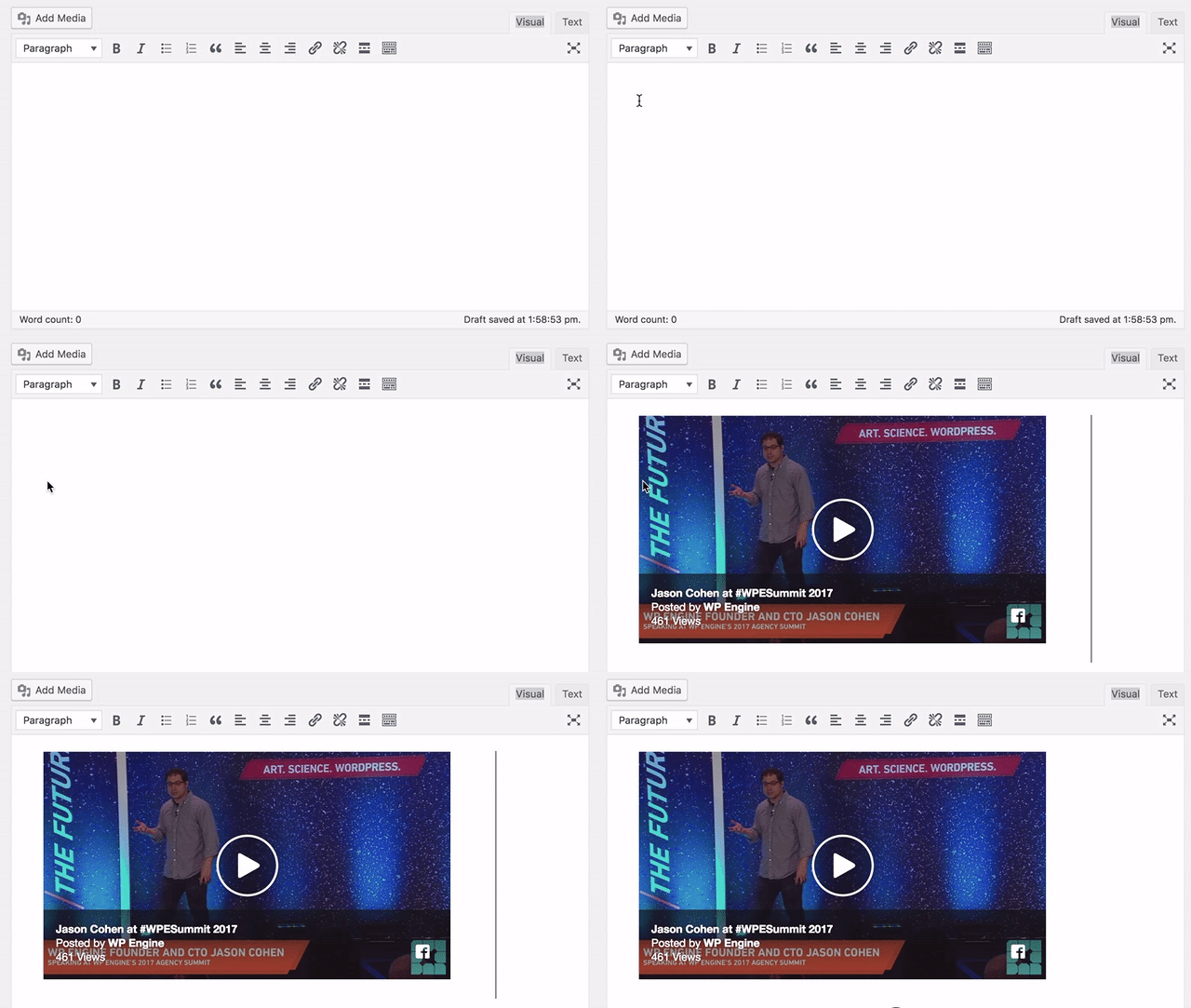
You’ll see the video’s thumbnail embed almost immediately, and if you check the front end of your site, you should be able to see (and play) the video on your post or page.
Embedding Instagram Videos in WordPress
Instagram videos look difficult to embed on the surface, but in reality they’re similar to implement as Facebook (although still slightly more complex than YouTube and Vimeo).
First, head to the Instagram video you’d like to embed, and click the three dots in the bottom right-hand corner:

From here, check the box if you’d like to include the video’s caption, and click the Copy Embed Code button:

Next, head to a WordPress post or page, access the Text editor, and paste in the code. Once you switch back to the Visual editor, you’ll see a placeholder for your video, and by previewing your front end, you should be able to see the Instagram embed on your site:
Embedding Self-Hosted Videos in WordPress
Embedding self-hosted MP4 video into your WordPress website is just as simple as doing so with YouTube and Vimeo videos.
With your MP4 video in hand, navigate to the Media > Add New screen within WordPress, which will bring you to the Upload New Media screen:

You can either use the Select Files button and navigate to your video, or simply drag and drop your video onto the screen:

From here, you can select your video as normal from the Media Library within a post or page. However, due to bandwidth and site speed issues, we’d recommend using a dedicated third-party video hosting provider.
Regardless of how you’d like to embed videos, you’ll need a rock-solid and quick WordPress host. WP Engine has many plans tailored to practically any need, so drop us a line to find out more!
]]>
Coronavirus is changing the way coffee is made and served in South Korea.Image: REUTERS/Kim Hong-Ji
- A cafe in Daejeon, South Korea, is using robots to make customers coffee to maintain social distancing.
- The system can make 60 different types of drinks, and serve customers at their tables.
- An order of six drinks, processed through a kiosk, takes seven minutes.
- There is only one human employee at the cafe, responsible for cleaning and refills.
The new robot barista at a cafe in Daejeon, South Korea, is courteous and swift as it seamlessly makes its way towards customers.
“Here is your Rooibos almonds tea latte, please enjoy. It’s even better if you stir it,” it says, as a customer reaches for her drink on a tray installed within the large, gleaming white, capsule-shaped robot.
Have you read?
- How likely is it a robot will take your job? This US study has the odds
- Coronavirus: Graduates replaced with robots in Japan
- In pictures: this is what social distancing looks like around the world
After managing to contain an outbreak of the new coronavirus that infected more than 11,000 and killed 269, South Korea is slowly transitioning from intensive social distancing rules towards what the government calls “distancing in daily life”.
Robots could help people observe social distancing in public, said Lee Dong-bae, director of research at Vision Semicon, the smart factory solution provider that developed the robot barista.
“Our system needs no input from people from order to delivery, and tables are sparsely arranged to ensure smooth movements of the robots, which fits well with the current distancing campaign,” he said.
The system, which uses a coffee-making robotic arm and a serving robot, can make 60 different types of coffee and serves the drinks to customers at their seats. It can also communicate and transmit data to other devices and contains self-driving technology to calculate the best routes around the cafe.

An order of six drinks, processed through a kiosk, took just seven minutes. The only human employee at the two-storey cafe was a patissier who also has some cleaning duties and refills ingredients.

The manufacturer aims to supply at least 30 cafes with robots this year. It is also working with a state-run science institute on an upgrade that would add big data and artificial intelligence technology to make custom drinks.
“Robots are fun and it was easy because you don’t have to pick up your order,” said student Lee Chae-mi, 23.
“But I’m also a bit of worried about the job market as many of my friends are doing part-time jobs at cafes and these robots would replace humans.”
]]>When the Covid-19 pandemic hit, that future became the present: Untact has become a key plank of President Moon Jae-in’s 76 trillion won ($62 billion) “New Deal” program. The name is of course a nod to the patchwork of stimulus measures that helped the U.S. overcome the Great Depression. While South Korea hasn’t experienced a slump of that magnitude, economic growth has been sluggish in recent years, averaging 2.9% a year since 2010, compared with 4.4% annually from 2000 to 2009. The government anticipates growth of 0.1% in 2020, but the central bank and private economists are forecasting a contraction, the first since the Asian financial crisis in the 1990s.
A 136-page report released this month detailing Moon’s program mentions untact 47 times. Pledging to create 550,000 new jobs, the plan envisions investments in remote work systems for 160,000 companies, a high-speed internet infrastructure to connect 1,300 farming and fishing villages, and tablet PCs for 240,000 students. The report also calls for further investment in robots, drones, self-driving vehicles, and other technologies that will reduce the need for person-to-person contact.
While other governments are ramping up spending to revive their economies, South Korea wants to leverage stimulus to improve its competitive position, particularly vis-a-vis China. The country’s policymakers and business leaders have a history of working together to stake out key positions in global supply chains, often by claiming territory ceded by other countries.
Cars are a case in point. In the 1980s, when automakers in Japan and Germany went upscale, partly in response to U.S. import quotas, South Korean peers such as Hyundai Motor Co. stuck with making small, affordable, fuel-efficient cars that slowly but surely accumulated market share as their reliability improved. Something similar happened with memory chips. As makers of semiconductors in the U.S. and Japan migrated away from what had become a low-margins segment, South Korean companies like Samsung Electronics Co. and SK Hynix Inc. moved in. Both profited greatly from the surge in demand for memory chips when sales of mobile phones took off.
More recently, China has muscled into industries where South Korea is strong, including TVs, semiconductors, mobile phones, and shipbuilding. China’s leadership is also doling out generous incentives as part of a plan to achieve dominance in leading-edge sectors such as artificial intelligence and alternative fuel vehicles by 2025.
Beijing’s ambitions have provoked tensions in Washington and other capitals. Moon’s economic program includes policies to reduce South Korea’s reliance on China as an export market and offers incentives to Korean companies for “reshoring.” Some elements of the plan also seem designed to stir up nationalistic sentiment, such as the pledge to raise an army of 100,000 specialists in AI. That harkens back to an oft-told tale of how a king five centuries ago didn’t heed a warning from a scholar to train an army of 100,000 soldiers, enabling Japanese samurai warriors to rampage across the land.
Kim Rando, a professor of consumer science at Seoul National University who led the team that coined the term “untact,” says South Korea’s record of embracing new technologies and its relatively small size may allow it to quickly become a leader in the emerging field. “What is a niche often becomes mainstream sooner or later,” he says. “Covid-19 will probably compel many nations that have been nonchalant about untacting technology to take this trend seriously.”
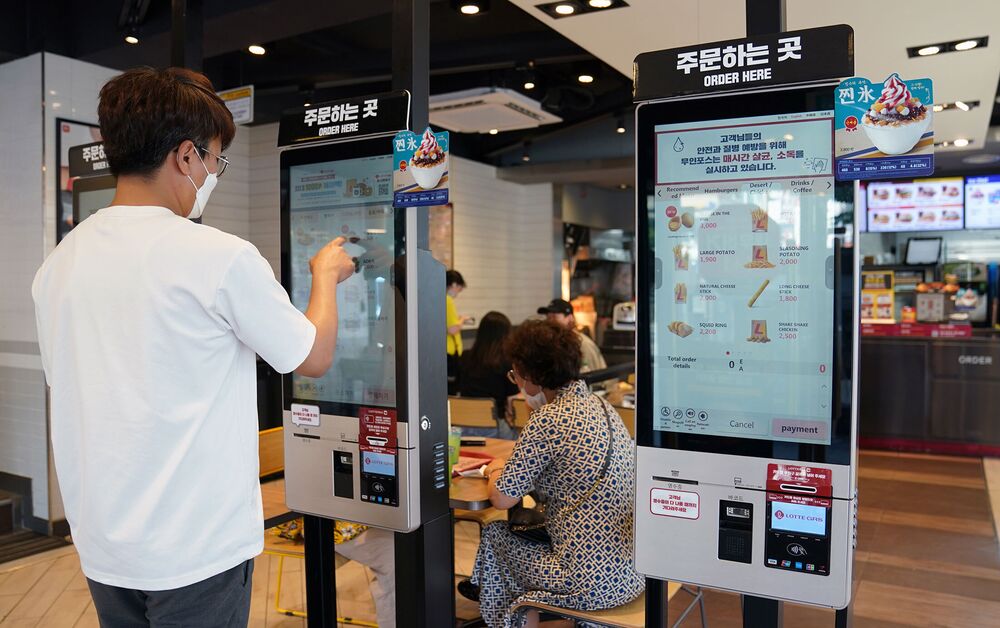
South Korea already ranks No. 2 worldwide in the density of robots in manufacturing, according to the International Federation of Robotics, with 774 installed for every 10,000 workers. The comparable figure for Germany is 338, and in the U.S. it’s 217. Moon’s goal of raising the minimum wage to 10,000 won an hour (vs. 8,590 won now) has spurred fast-food restaurants and convenience store operators to dial up investment in automation. Lotteria, the top hamburger chain in the country, has installed self-ordering kiosks at more than half its locations, while retailers Emart24 and Korea Seven have been experimenting with cashierless outlets for a few years.
Moon has political and economic capital on his side. His coalition scored a landslide victory in parliamentary elections in April, which makes passage of a third supplementary budget to fund the New Deal likely. The administration has already secured approval for some 24 trillion won in nonbudgeted spending this year.
South Korea is expected to post a deficit equal to 4% of GDP this year, the first shortfall since the global financial crisis. The central bank has slashed interest rates to a record low of 0.5% and is gearing up to absorb trillions of won in government bonds to back Moon’s initiatives.
The private sector is getting in on the act, too: There’s now an investment fund with “untact” in its name run by an affiliate of the country’s biggest conglomerate. “Untact sums up the direction in which the world is changing fundamentally,” says Jeong Dae-ho, who runs the fund at Samsung Asset Management Co. “The coronavirus will accelerate the shift to a so-called remote world.”
One company Jeong is keeping an eye on is Seoul-based Rsupport Co., which has the largest share of the market for remote working software in South Korea and Japan. The company says use of its service has multiplied as much as 44 times this year, and its share price has tripled. “The coronavirus demands the world accelerate its transition to a contactless society because it will never be the same even after it returns to normal,” says Seo Hyung-su, Rsupport’s founder and chief executive officer. “With just enough government support, untact could be the stepping stone for a variety of technology businesses to go mainstream.”
Read next: China Millionaire Livestreamer Viya Shows Online Shopping FutureBOTTOM LINE – With an edge in robotics and telecommunications, South Korea seeks to position itself in remote work via a massive new spending plan.Before it’s here, it’s on the Bloomberg Terminal.
A quick overview of all four models reveals that you can’t go wrong by owning a Hyundai SUV if you don’t need 3 rows.
The Santa Fe leads Hyundai’s 2020 2-row SUV lineup
Though tied for third on the U.S. News list of Best SUVs with 2 Rows for 2020, Hyundai Santa Fe topped their list of Best Midsize SUVs for 2020. Its 235 hp turbocharged 4-cylinder engine provides adequate acceleration without feeling underpowered while maintaining respectable fuel economy. Santa Fe owners can expect to enjoy a spacious, comfortable ride with high-end interior features, adequate and well-organized cargo space, and plenty of user-friendly tech features.
by TJ Heffner